A routine built around you
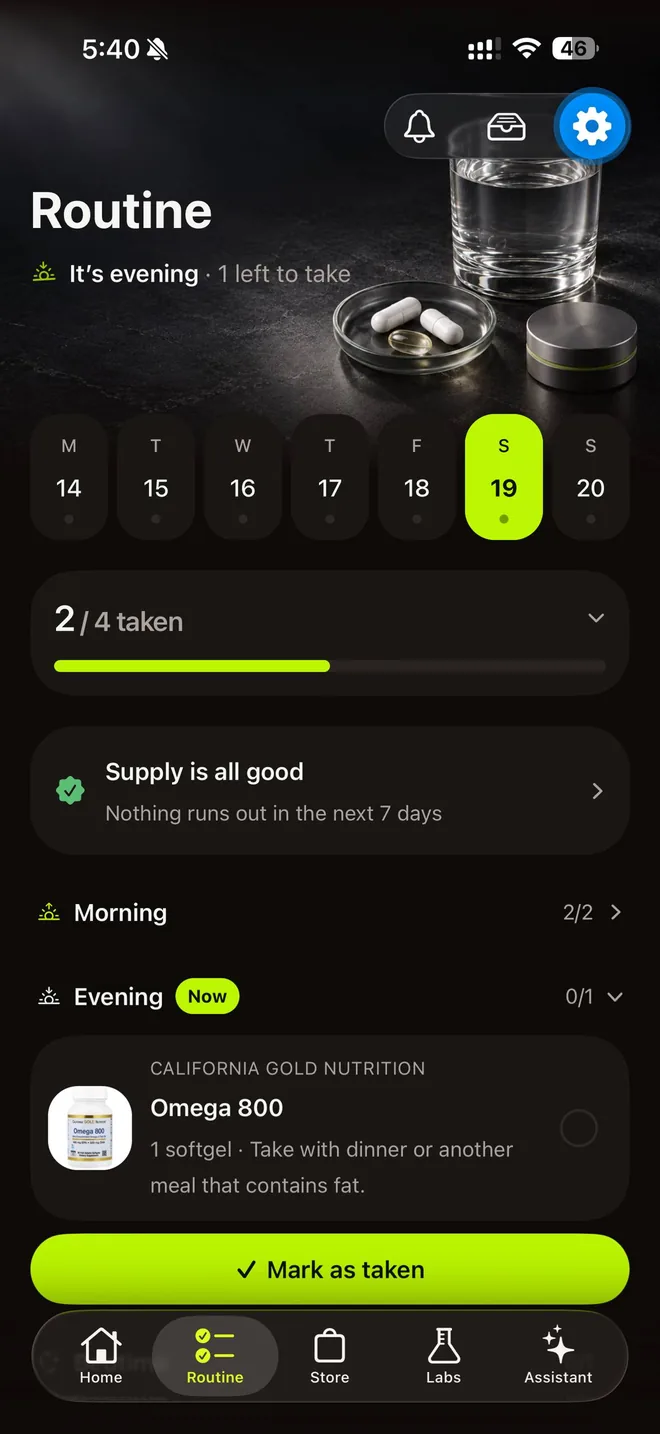
Answer a few questions about your goals, diet and what you already take. The app builds a daily routine and explains why each product is in it — and rebuilds it when your answers change.
 Supin
SupinA daily routine built around your goals, lab results explained in plain language, and reminders that keep it all running.
Educational guidance, not medical advice.
Features
No guessing what to take or why. Every suggestion comes with its reasoning, and nothing runs through the AI until you allow it.
Answer a few questions about your goals, diet and what you already take. The app builds a daily routine and explains why each product is in it — and rebuilds it when your answers change.
Take a photo of a supplement. The app matches it to its catalogue — or looks it up and adds it as your own product — so you can put it on your shelf or in your routine.
Each product gets a score out of 100 for how well it fits your goals, diet, health profile, labs and routine. It's worked out on your phone, with the reasons behind every part of it.
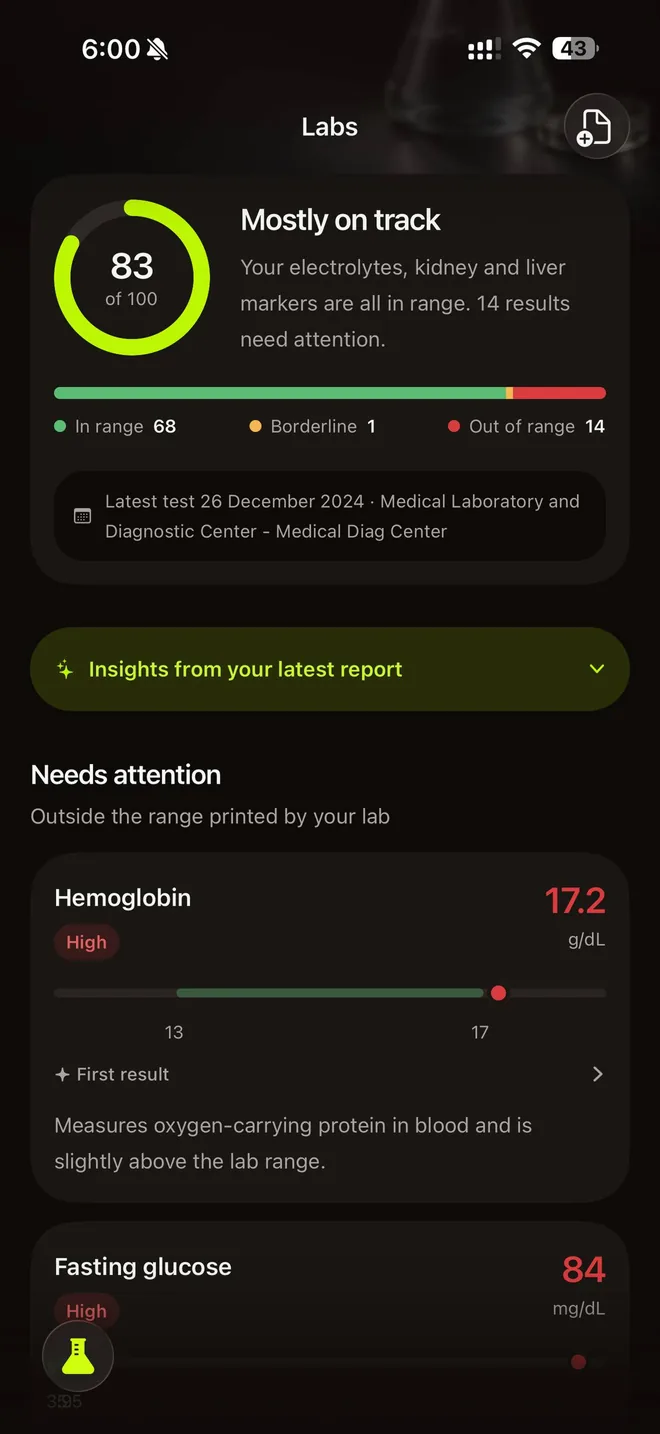
Upload a lab report as a PDF or a photo, confirm the values, and follow each marker over time against the lab's own reference range. The file is read once and never stored.
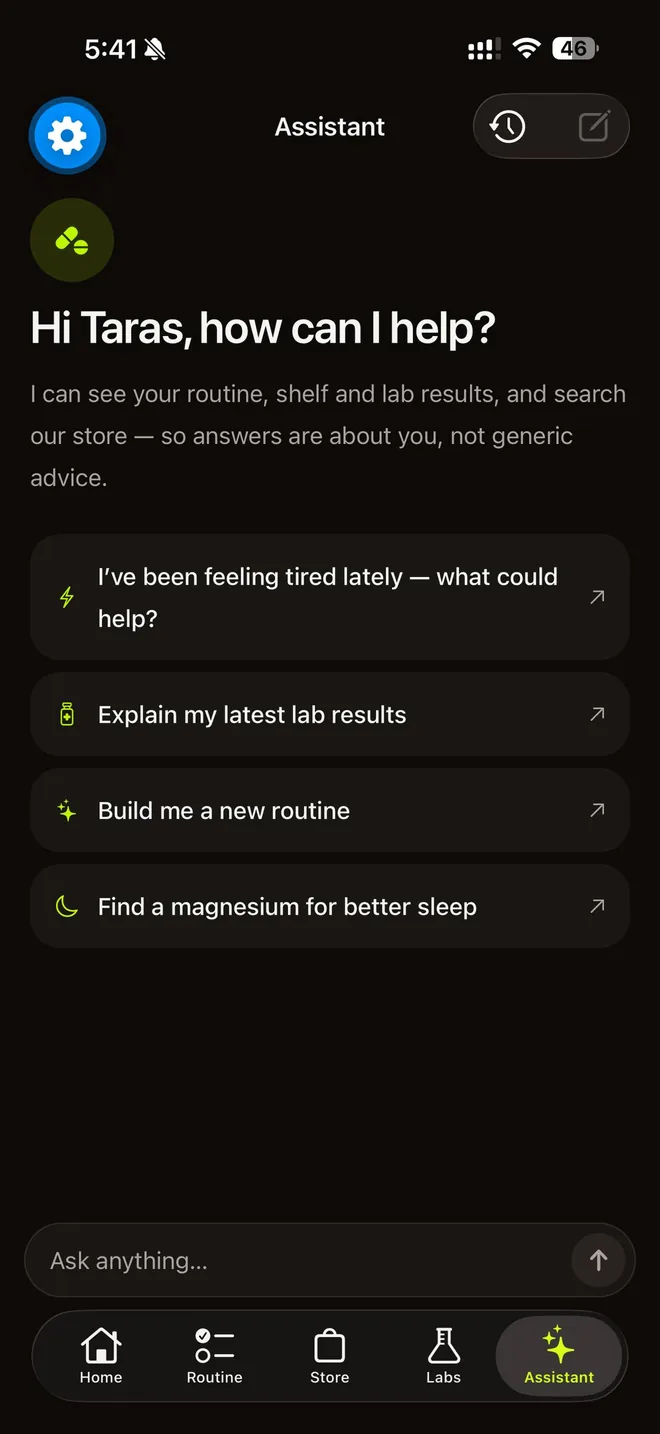
Ask about anything in your routine. Answers draw on your shelf, your routine and the lab values you confirmed — and only once you have allowed the AI features.
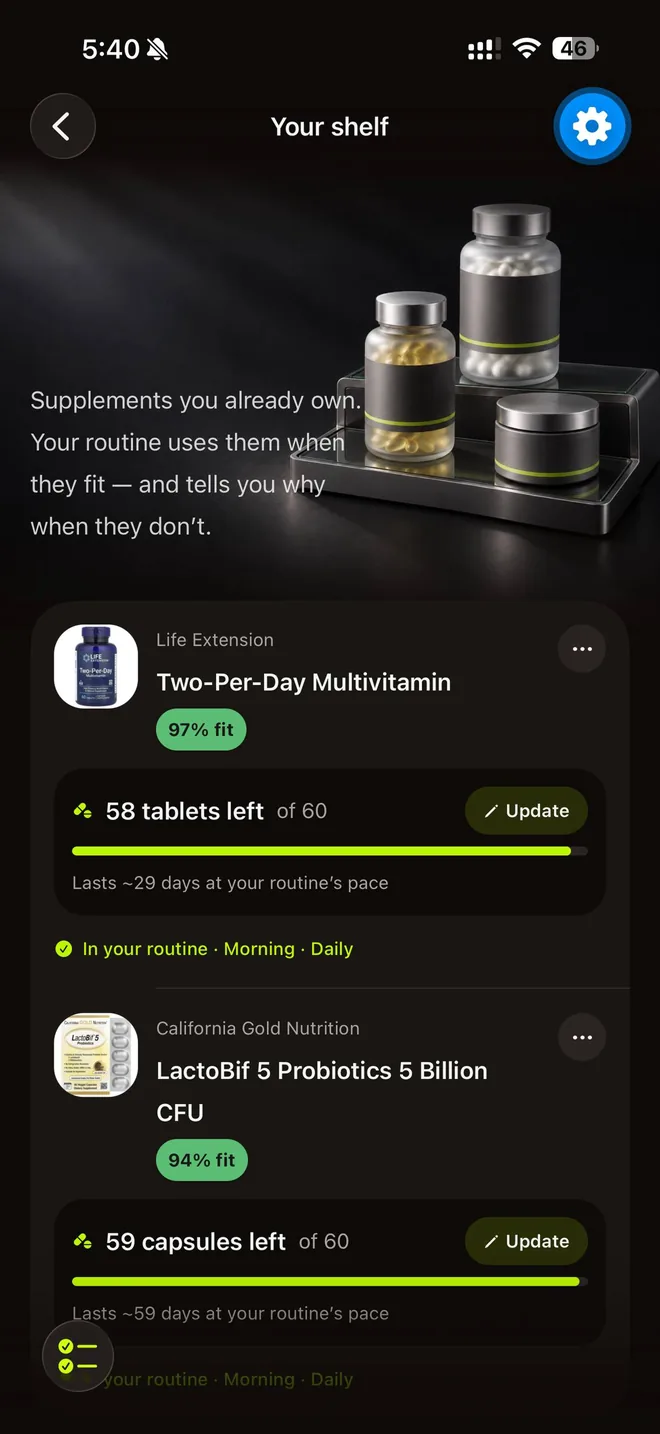
Scan the bottles you already own and each one gets a fit score for you and a count of what's left. The count goes down as you take them, shows how many days it lasts at your routine's pace, and you get a heads-up a few days before anything runs out.
And more
Fill a pillbox, see your daily totals from the labels, and keep your data to yourself.
Fill your pillbox one bottle at a time: the app tells you what goes into which compartment.
See what your routine adds up to each day, taken from the product labels, with % of daily value where the label gives it.
No ads, no tracking across other apps, no selling your data. Delete your account and everything in it from Settings at any time.
How it works
Your goals — sleep, energy, focus, training and more — your diet, and anything that rules a product out, like pregnancy, medications or allergies.
A daily plan of what to take and when, with the reasoning for every product. Scan what you already own and it's taken into account.
Reminders, supply counts and refill heads-ups keep the routine running; upload lab results to see how your markers move over time.
All 58 features
Every feature in the app: building your routine, scanning bottles, tracking, refills, reminders, lab results, the assistant and your doctor report.
Sign up with Apple or email. Create an account with Sign in with Apple or email and password; email sign-ups get a confirmation link.
Reset a forgotten password. Get a reset email and either tap the link or type the code from the email, then choose a new password.
A short questionnaire about you. Pick up to 5 goals (energy, sleep, stress & mood, focus, immunity, fitness & recovery, heart, gut, skin/hair/nails, general wellness), then age range, sex, diet, oily fish, sun, what you already take and forms you'd rather avoid.
Follow-up questions that fit your goals. Only relevant extras appear: what disturbs your sleep, when your energy dips, how stress shows up, training frequency, gut concerns.
Health flags that rule products out. Tell it about pregnancy/breastfeeding/trying to conceive, prescription medication, a chronic condition or allergies (fish, shellfish, soy, dairy, gluten, nuts, eggs) so unsuitable products are left out or flagged for a pharmacist.
Choose how full your routine is. Core (3–4 products), Balanced (5–7) or Complete (8–10); products you already own count toward it.
A routine with the reasons behind it. The "AI analysis" card shows your priorities, why each product is there, what was considered from your shelf, what's new and limits/next steps.
Rebuild when things change. When your answers or shelf change, the Routine tab offers to regenerate; you can also regenerate any time or edit answers in Settings → Your answers.
Add or edit any product yourself. Choose part of day, days (every day, weekdays, every other day, or custom) and amount per take; hold a row to edit or remove.
Today on Home. A greeting, what's next and how many are left today, plus quick actions for Scan, Ask AI and Labs.
Tick off each dose. Tap the circle to mark a product taken, or "Mark as taken" for a whole part of the day.
Week view and history. A Monday–Sunday strip with a completion dot per day; open any day to see what was planned.
This week at a glance. A Home card with doses taken so far this week, perfect-day streaks and which part of the day slips most.
Daily nutrient totals. What the day's routine adds up to per nutrient, from product labels, with % of daily value where the label gives it; mg and IU are never mixed.
Tip of the day. A short daily tip card on Home.
Scan a bottle. Photograph a label (or pick a photo); the app reads it, checks the catalog, looks it up online if needed and builds a product page saved just for you.
Scan a whole shelf in a row. Keep shooting bottles while earlier ones are identified in the background and added to your shelf automatically.
Your shelf. Everything you own in one list, with what's in your routine and what isn't; add, remove or update stock.
Private product photos. Photos you scan are kept in private storage, reachable only through your account.
Retake a product photo. Replace the picture on a product you scanned.
Product pages. About, how to use, ingredients per serving, information gathered from the web and similar products.
Personal fit score (0–100). Each product is scored for your goals, safety for you, diet, lab results, age & sex and your routine, with plain reasons for every part, worked out on the phone.
Browse the catalog. Search products, brands and categories; sort by best fit, most reviewed, top rated, name or newest; filter by category, rating, form and brand. Tab renamed "Catalog" [branch] (was "Store").
Pills-left count per bottle. Set how many are left; the count goes down as you mark doses taken and shows roughly how many days remain.
Running-low alerts. A Home/Routine card and one notification when a product gets to about 5 days left, re-armed after you restock. [branch logic; main has].
Guided pillbox filling. Walks you bottle by bottle through what goes in each compartment for the next 7 days; powders and liquids are listed as "take at the time".
Pillbox status on Home. "Prepare your week" until filled, then "Pillbox ready" with the refill day.
Pillbox refill reminder. Optional, off by default: a reminder the evening before your pillbox runs out.
Reminders per part of the day. Pick a time for morning, noon, evening and bedtime; a reminder is skipped when everything for that part is already marked.
Act from the notification. "Mark as taken", "Mark all as taken", "View supplements", and for repeats "Remind in 30 min" or "Stop reminders".
"Keep reminding me". Optional per part of the day: repeats every 10 minutes, up to 6 times, until you log it or stop it; quiet hours respected.
Detailed or discreet notifications. "Detailed" names what's due; "Simple" shows no supplement names or counts on the lock screen.
At most one household notice a day. Running-low and pillbox-refill notices share a one-a-day cap.
Trial-ending notice. A heads-up before a free trial ends, with a "Manage subscription" button.
Upload a lab report. PDF, photo or camera shot (under 10 MB) from any lab; the file is read once and discarded, only the values are kept.
Confirm every value. Review extracted results, units, the lab's ranges and the collection date before saving.
Markers against your lab's range. A range bar for each marker, "Outside the range" and "Closer to range" lists, all compared with the range printed on your report.
Each marker over time. A chart of past values with the reference range band, what the marker measures and what can affect it.
Plain-language explanation. An optional AI explanation of a report, after AI permission.
Who to talk to. For a result outside the range: "worth discussing with your GP", who may refer you to a named specialist.
Critical results flagged. If the lab marked a result critical, a clear "please contact your doctor" notice always shows.
Which tests to consider. A core panel plus tests matched to your answers, how to prepare, and "Copy list for the lab".
Lab results affect suggestions. If a result is above your lab's range, the routine won't add that nutrient on its own.
Delete any report. Long-press a report to delete it.
Assistant that knows your data. Chat with an AI that can look at your profile, routine, past routines, adherence, shelf, lab results and the catalog, showing each step it takes.
Product picks in chat. It shows product cards you can open, and can rebuild your routine from the chat.
Suggested next questions. Starter prompts and "What next" chips/cards under each reply; actions open the normal app screen.
Ask about any result or product. "Ask AI about my results", "Questions about this result?", "Not sure? Ask AI" while adding a product.
Clear a conversation. Start fresh any time; check-in history stays.
Check-ins on how you feel. Optional 0–10 ratings per goal, dated so you can see your history; no score, no diagnosis.
Your progress. Latest vs previous rating per goal, a chart from the second rating, and add a rating yourself.
Check-in controls. On/off, notifications (max one a day the first month, then weekly; never in quiet hours), frequency (weekly, 2 weeks, monthly) and pause for 7 or 30 days.
Doctor report. Pick 30 or 90 days and sections (lab results, current supplements, intake history), preview, then share a PDF or a CSV zip; made on the phone, nothing stored. Settings → For your doctor, and Labs.
AI only with permission. Before any AI use, a screen lists what is sent and to whom; "Not now" keeps AI off while the rest works; switch it in Settings → AI features.
Edit your answers. Change any answer later; required follow-ups (e.g. a medicine's name) are asked again.
Delete your account in the app. Permanent deletion of profile, routine, shelf, labs, photos and chat from Settings (and, on the next build [branch], from the paywall and onboarding).
Light and dark mode. Follows your iPhone's appearance, each with its own artwork.
Subscription management. Monthly/yearly plans, free trial for eligible new subscribers, restore purchases, manage subscription from Settings.
Blog
FAQs
Answers to what people ask most about Supin: what it does, what it doesn't, your data and your subscription. Can't find yours? Write to us.
No. Educational guidance, not medical advice. The app doesn't diagnose anything, doesn't set doses from your lab values (amounts follow the product labels), and isn't a medical device. Talk to a doctor or pharmacist before starting, stopping or changing a supplement — especially if you are pregnant, take medication or have a medical condition.
From your answers: your goals, diet, age range, health flags such as pregnancy, medications and allergies, and the supplements you already take. Every product in the routine comes with the reason it's there, and the routine can be rebuilt whenever your answers or your shelf change.
The file you upload is read once to pull out the values, then discarded — it is never stored. You check the values before they are saved, and only the values you confirm are kept, so you can follow each marker over time.
Only if you allow it. Before any AI feature runs, the app shows what will be sent, who receives it and why. If you choose “Not now”, nothing is sent and the AI features stay off while the rest of the app keeps working. You can change your choice in Settings at any time.
No. The app doesn't make, sell or ship supplements. It helps you organise the ones you choose, and always read the product label before you take anything.
Supin is a subscription, with monthly and yearly plans. Eligible new subscribers get a free trial, and the App Store shows the price and the trial length before you confirm. Cancel any time in your Apple ID settings.
With our hosting providers, mainly in the United Kingdom, with some processing in the European Union and the United States. You can delete your account and all of its data in the app (Settings → Delete account); it's permanent. A subscription is cancelled separately in your Apple ID settings.
Adults (18 and over) who take supplements, or are thinking about it, and want one place to keep track of what they take, why, and when. It is available on iPhone.
Yes. Photograph a bottle's label and the app identifies it from its catalog or builds a product page from the photo and the web. You can scan bottle after bottle while earlier ones are identified in the background, and they land on your shelf.
A number from 0 to 100 for how well a product suits you, built from your goals, safety for you, diet, lab results, age and sex, and your current routine. Each part shows its reasons, and it is worked out on your phone. It's guidance, not medical advice.
Yes. A guided screen tells you, bottle by bottle, what goes into each compartment for the next 7 days. Powders and liquids are listed separately to take at the time, and an optional reminder can tell you the evening before the pillbox runs out.
On the next update, yes: choose "Simple" under Notification style and reminders show no supplement names or counts. "Detailed" names what's due.
By default you get one reminder per part of the day. You can turn on "Keep reminding me" for any part of the day to get a repeat every 10 minutes, up to 6 times, until you mark it taken or tap "Stop reminders".
On the next update, yes: create a doctor report for the last 30 or 90 days with your lab results, current supplements and intake history, then share it as a PDF or as CSV files. It's made on your phone and nothing is stored.
It suggests a small core panel plus tests matched to your answers, explains how to prepare, and lets you copy the list to show your doctor or lab.
The app shows it against the range printed on your report. On the next update it also notes that it's worth discussing with your GP, and if the lab marked a result as critical it asks you to contact your doctor. It never diagnoses or sets doses from lab values.
Yes: Core (3–4 products), Balanced (5–7) or Complete (8–10). It's a target, not a rule; only products that are suitable for you and fit your goals are added, and what you already own counts.
Enter how many are left; the count drops as you mark doses taken. Around 5 days before a product runs out you get one notice, and it resets after you restock.
Optional short 0–10 questions about how you feel for each goal. Your answers are kept with their dates so you can look back; they aren't a measure of what a supplement did. You can pause them, change how often they come, or turn them off.
Yes. The app follows your iPhone's light or dark setting, with artwork for each.

Answer a few questions and get a routine built around your goals, with the reasoning for every product. On iPhone.
